If you accidentally bought the wrong game, it won't launch on your computer, or it simply didn't meet your expectations, don't worry. Steam has an official refund system that allows you to get your money back for most purchases.
In this guide, we'll explain how to request a refund for a game on Steam, what requirements you need to meet, how long the refund process takes, and when your request may be declined.
Can You Get a Refund for a Steam Game?
Yes. Steam officially allows refunds for most games, DLC, and other digital content.
The main requirement is that you meet Steam's basic refund policy.
You can request a refund if:
- the purchase was made within the last 14 days;
- you have played the game for less than 2 hours;
- the game was purchased directly through Steam.
Even if one of these conditions is not met, you can still submit a refund request. In some cases, Steam reviews requests on an individual basis.
Steam Refund Requirements
For most games, the following rules apply:
- the purchase was made less than 14 days ago;
- your playtime does not exceed 2 hours;
- the game has not been restricted due to violations of Steam's rules;
- you do not request refunds excessively.
If all of these conditions are met, your refund request is very likely to be approved.
Video Guide
If you'd rather watch the entire process, check out our detailed video tutorial below.
How to Refund a Game on Steam
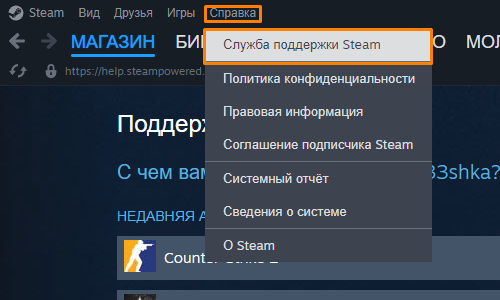
Step 1. Open Steam Support
Launch the Steam client or visit the Steam Support website and sign in to your account.
Go to:
Help → Steam Support
Step 2. Select the Game
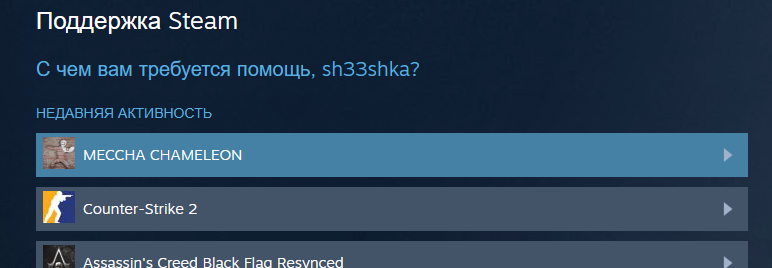
Find the game you want to refund in your list of recent purchases.
If you don't see it, use the search function.
Step 3. Select "Purchased by Mistake"
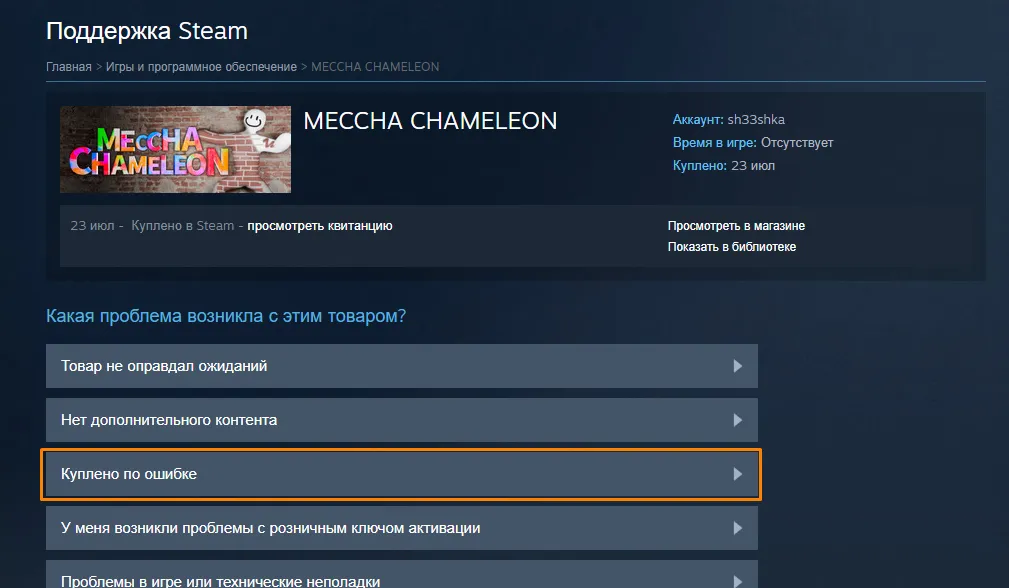
From the list of options, choose "Purchased by Mistake", then click "I'd like to request a refund". A refund form will then open where you can choose your preferred refund method and continue with the request.
Step 4. Select a Reason and Add a Note
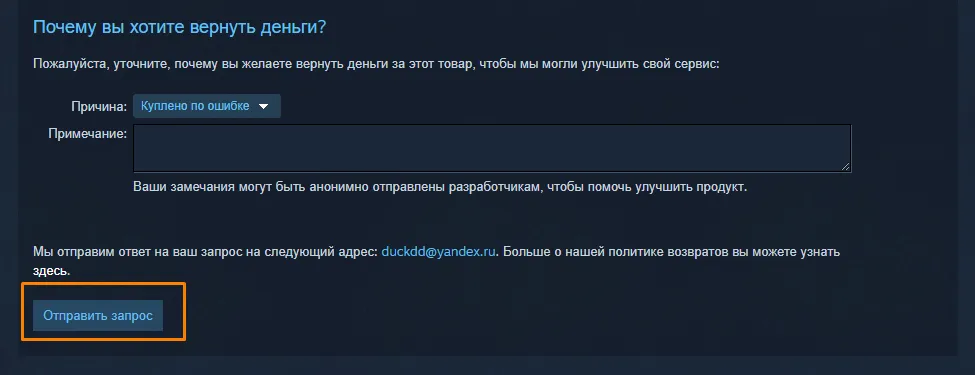
Choose "The game didn't meet the technical requirements" as the reason.
If you'd like, you can add a short note explaining that the game doesn't run properly on your computer or does not perform as expected.
Step 5. Click "Submit Request"
After selecting the reason, click:
"Submit Request".
How Long Does a Steam Refund Take?
Once your request is approved, refunds usually take:
- up to 7 days for refunds to a bank card;
- up to 24 hours for refunds to your Steam Wallet (in most cases).
Processing times may vary slightly depending on your bank or payment provider.
Can You Refund DLC?
Yes.
Most DLC follows the same refund rules:
- it was purchased less than 14 days ago;
- it has seen little or no use;
- the DLC has not permanently modified your game account or in-game content.
Can You Refund a Pre-Order?
Yes.
Pre-orders can usually be canceled before the game's release without restrictions.
After release, Steam's standard refund policy applies: less than 14 days since purchase and under 2 hours of playtime.
Can You Refund In-Game Purchases?
Some games support refunds for in-game purchases.
If the developer allows it, you can usually request a refund within 48 hours of purchase, provided the item has not been used, modified, or traded.
Why Was My Steam Refund Denied?
The most common reasons are:
- more than 14 days have passed since the purchase;
- you have played for more than 2 hours;
- you request refunds too frequently;
- the game was not purchased through Steam;
- the content is not eligible under Steam's refund policy.
Frequently Asked Questions
Can I get a refund after 14 days?
You can still submit a request, but approval is not guaranteed. Steam sometimes reviews these cases individually.
Can I get a refund if I played for more than 2 hours?
You can still try. Steam Support occasionally makes exceptions, especially in cases involving serious technical issues.
How long does Steam take to review a refund request?
Most requests receive a response within a few hours, although some may take several days.
Will the money be refunded to my bank card?
Yes, if your payment method supports it. Otherwise, the refund may be credited to your Steam Wallet.
Summary
Getting a refund for a Steam game is straightforward. If the purchase was made within the last 14 days and your playtime is under 2 hours, your refund will usually be approved without any issues.
If you're unsure whether your situation qualifies, it's still worth submitting a request—Steam often reviews refund requests on a case-by-case basis.

How to get money back for a game on Steam in 2026 - detailed instructions
If you accidentally bought the wrong game, it won't launch on your computer, or it simply didn't meet your expectations, don't worry. Steam has an official refund system that allows you to get your money back for most purchases.
In this guide, we'll explain how to request a refund for a game on Steam, what requirements you need to meet, how long the refund process takes, and when your request may be declined.
Can You Get a Refund for a Steam Game?
Yes. Steam officially allows refunds for most games, DLC, and other digital content.
The main requirement is that you meet Steam's basic refund policy.
You can request a refund if:
Even if one of these conditions is not met, you can still submit a refund request. In some cases, Steam reviews requests on an individual basis.
Steam Refund Requirements
For most games, the following rules apply:
If all of these conditions are met, your refund request is very likely to be approved.
Video Guide
If you'd rather watch the entire process, check out our detailed video tutorial below.
How to Refund a Game on Steam
Step 1. Open Steam Support
Launch the Steam client or visit the Steam Support website and sign in to your account.
Go to:
Help → Steam Support
Step 2. Select the Game
Find the game you want to refund in your list of recent purchases.
If you don't see it, use the search function.
Step 3. Select "Purchased by Mistake"
From the list of options, choose "Purchased by Mistake", then click "I'd like to request a refund". A refund form will then open where you can choose your preferred refund method and continue with the request.
Step 4. Select a Reason and Add a Note
Choose "The game didn't meet the technical requirements" as the reason.
If you'd like, you can add a short note explaining that the game doesn't run properly on your computer or does not perform as expected.
Step 5. Click "Submit Request"
After selecting the reason, click:
"Submit Request".
How Long Does a Steam Refund Take?
Once your request is approved, refunds usually take:
Processing times may vary slightly depending on your bank or payment provider.
Can You Refund DLC?
Yes.
Most DLC follows the same refund rules:
Can You Refund a Pre-Order?
Yes.
Pre-orders can usually be canceled before the game's release without restrictions.
After release, Steam's standard refund policy applies: less than 14 days since purchase and under 2 hours of playtime.
Can You Refund In-Game Purchases?
Some games support refunds for in-game purchases.
If the developer allows it, you can usually request a refund within 48 hours of purchase, provided the item has not been used, modified, or traded.
Why Was My Steam Refund Denied?
The most common reasons are:
Frequently Asked Questions
Can I get a refund after 14 days?
You can still submit a request, but approval is not guaranteed. Steam sometimes reviews these cases individually.
Can I get a refund if I played for more than 2 hours?
You can still try. Steam Support occasionally makes exceptions, especially in cases involving serious technical issues.
How long does Steam take to review a refund request?
Most requests receive a response within a few hours, although some may take several days.
Will the money be refunded to my bank card?
Yes, if your payment method supports it. Otherwise, the refund may be credited to your Steam Wallet.
Summary
Getting a refund for a Steam game is straightforward. If the purchase was made within the last 14 days and your playtime is under 2 hours, your refund will usually be approved without any issues.
If you're unsure whether your situation qualifies, it's still worth submitting a request—Steam often reviews refund requests on a case-by-case basis.
No comments yet